Sep 28, 2026
From Garbled Docker Imports to a DBX Fix: An Open Source Bug Report
How I traced garbled MySQL data during Docker initialization, reported the issue to DBX, and saw it reproduced, fixed, and verified in under three days.
I recently needed to deploy a frontend and backend together with Docker. Because the project was still in testing, the container also had to initialize the entire database on startup. What looked like a routine deployment ended up uncovering a bug in DBX.
This post walks through the full story: discovering the issue, tracing its cause, filing a GitHub issue, and watching the DBX team reproduce and fix it.
1. Chinese Text Became Garbled After Docker Initialization
After deploying the project, I noticed that the menus and related data in the frontend were all garbled. I opened the browser’s developer tools and checked the API responses. The backend was already returning corrupted text, which strongly suggested that the problem was in the database import process.
I did not have direct access to inspect the data inside the container at the time, so I asked GPT to help troubleshoot. We quickly found that although the full database export was encoded as UTF-8, the SQL file did not declare the connection character set at the beginning. Its header looked roughly like this:
-- Database export: ai_school_plat
-- Date: 2026-09-24 16:03:33
-- Generated by DBX

SET FOREIGN_KEY_CHECKS = 0;
Adding explicit character-set statements before the other SQL resolved the problem:
-- Database export: ai_school_plat
-- Date: 2026-09-24 16:03:33
-- Generated by DBX

SET NAMES utf8mb4;
SET CHARACTER SET utf8mb4;
SET character_set_connection = utf8mb4;
SET FOREIGN_KEY_CHECKS = 0;
The Chinese text in the SQL file was not the problem. The real issue was how the import client interpreted those UTF-8 bytes. If it used the wrong default character set, the text was decoded incorrectly and then stored as corrupted data.
2. Upgrading DBX Did Not Solve It
I was using DBX 0.5.x when I first encountered the issue. My initial assumption was that the version was simply outdated and that a newer release might already contain a fix. I upgraded to 0.6.21 and exported the database again.
The problem remained. Once I confirmed that it was not limited to an older release, I found the DBX repository on GitHub and filed a P2 bug report with the version, environment, reproduction steps, and Docker initialization scenario.
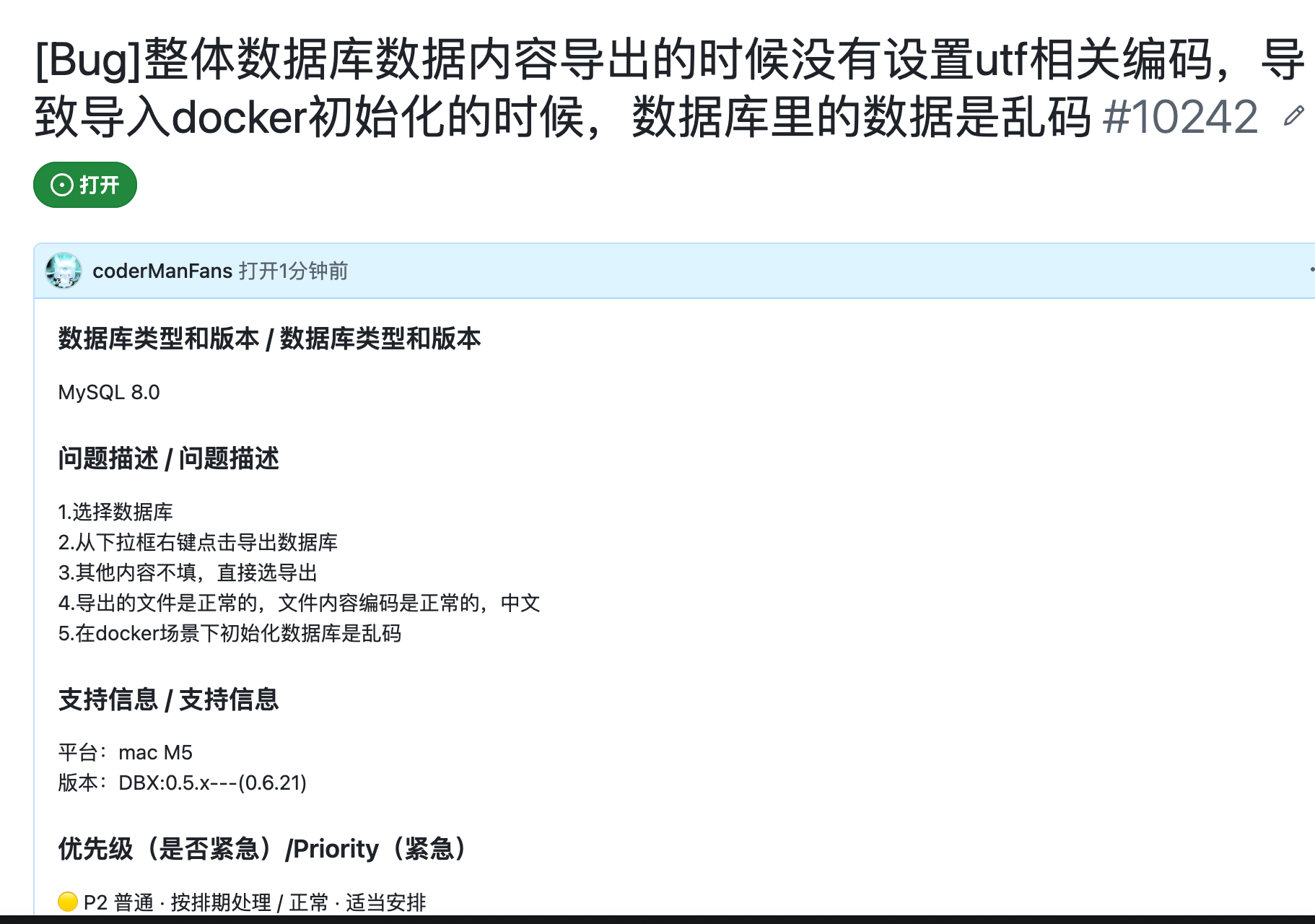
Related issue: #10242
3. The DBX Team Reproduced the Root Cause
After submitting the report, I looked through several other issues and did not expect an immediate fix. The bug did not affect normal database connections or queries; it mainly appeared when a DBX export was used to initialize a database in Docker.
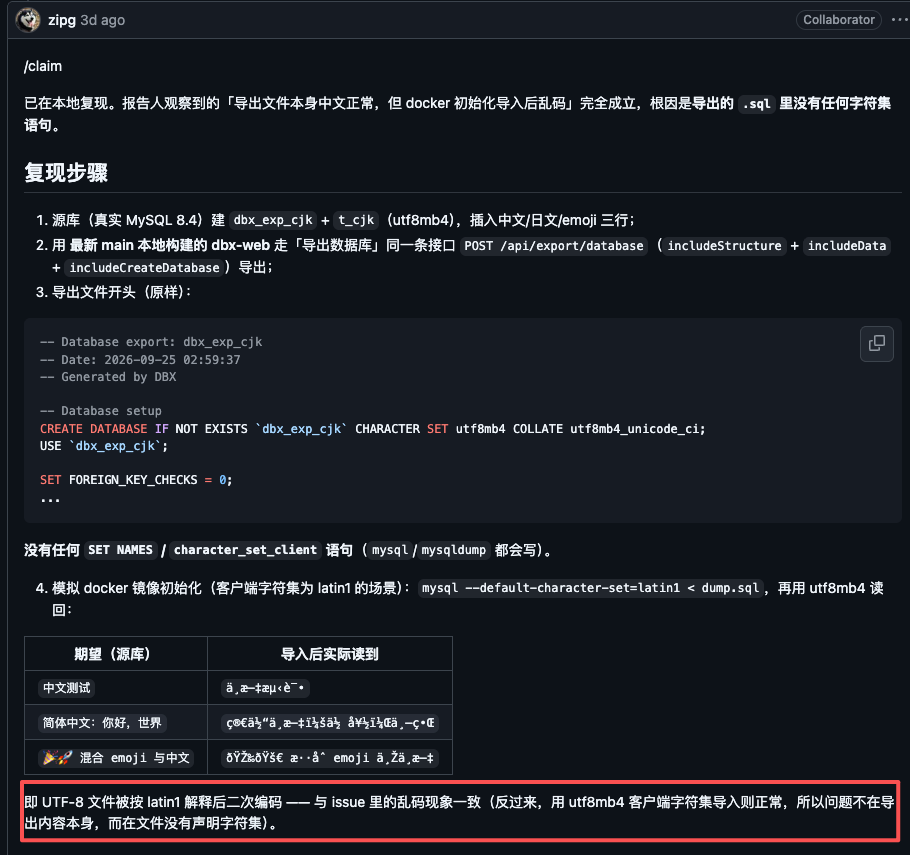
The DBX team nevertheless reproduced it quickly against a real MySQL 8.4 instance. They created test data containing Chinese, Japanese, and emoji characters, exported it through DBX, and then simulated a Docker initialization import whose client used an incorrect default character set.
Their test confirmed the diagnosis: the exported SQL contained no SET NAMES or equivalent connection character-set declaration. As a result, a client could interpret the UTF-8 file as Latin-1 or another default encoding before writing the incorrectly decoded data into MySQL.
4. The Fix and Its Verification
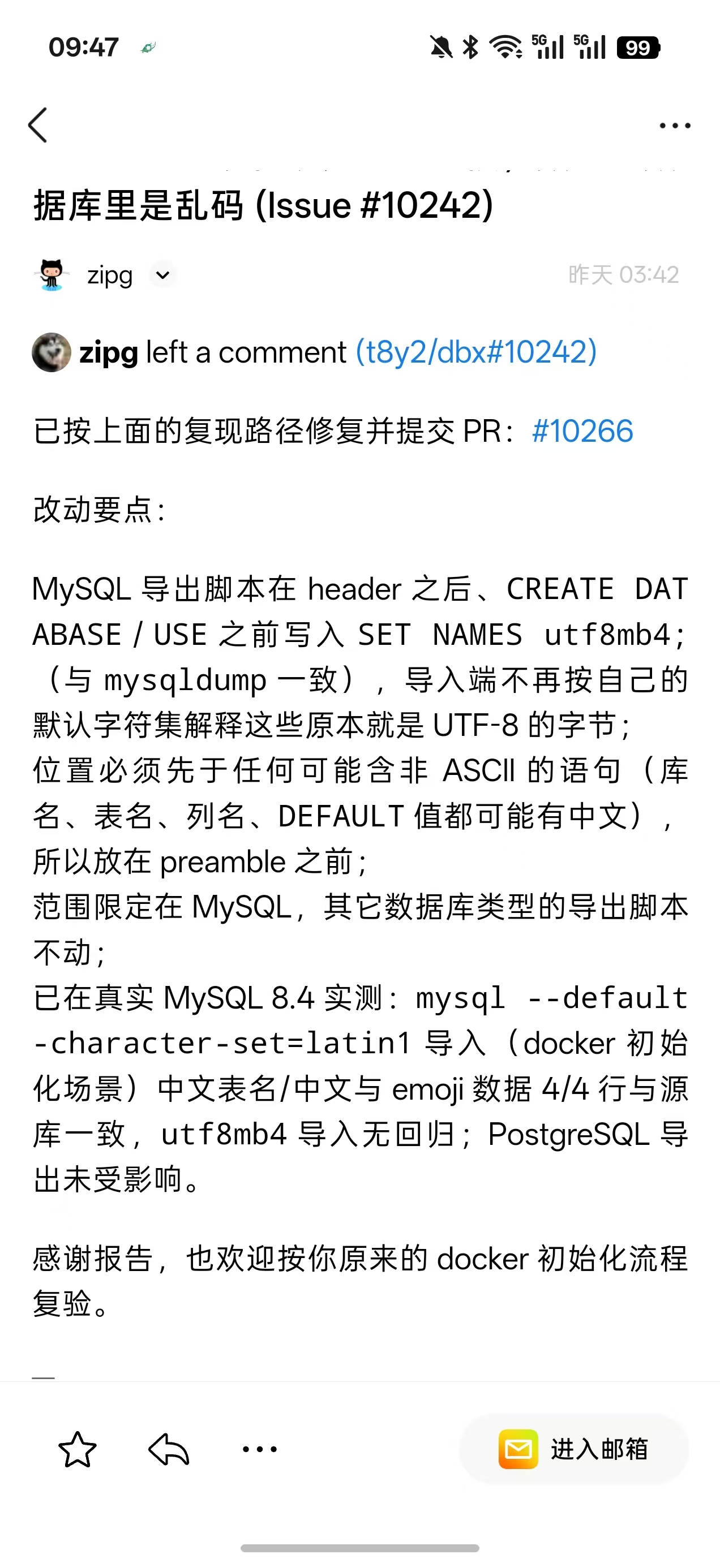
The DBX team then opened a fix that added the following statement to MySQL export scripts, immediately after the header and before CREATE DATABASE, USE, or other SQL statements:
SET NAMES utf8mb4;Its position matters. Database names, table names, column names, and default values may all contain non-ASCII characters, so the character set must be declared before any statement that could contain them.
The change was limited to MySQL exports and did not affect other database types. The team also verified it against a real MySQL 8.4 instance. Chinese table names, Chinese content, and emoji were restored correctly even when the importing client defaulted to Latin-1, while UTF-8 imports continued to work without regression.
5. A Great Open Source Collaboration Experience
Fewer than three days passed between reporting the problem and seeing the issue fixed and closed. The DBX team did more than respond quickly: they documented their reproduction, root-cause analysis, scope of the change, and test results clearly. That left a strong impression on me.
There are many database GUI tools available in China, but DBX stands out as a lightweight project that is evolving quickly. My confidence in it has grown gradually as I have learned about it and used it in real projects. Filing this issue was only a small contribution, but helping an open source project become a little more reliable was still rewarding.
If you are moving to DBX from another database tool and plan to use connection imports or database exports, the official documentation is a useful place to start: